

This newest version of Javelin software now includes Export 3D Model to IFC, Update Materials on Demand and more!
DOWNLOAD THE LATEST JAVELIN SOFTWARE
Release notes and system requirements
- Release Notes | System Requirements
- Supported Microsoft® Operating Systems include: Windows® 11
Installation instructions
- Save the .exe file locally
- Temporarily disable anti-virus software
- Close existing instances of Javelin software
- Double click .exe to install
NOTE: Javelin software requires Administrator Rights to successfully install the software.
JAVELIN SOFTWARE VERSION 6.8 NEW FEATURES
Export 3D Model to IFC
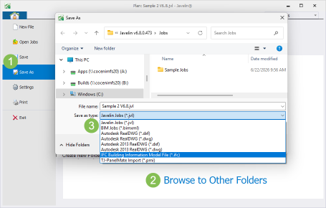
Saving your Javelin 3D model to an IFC file makes it easy to share your model across the broader BIM ecosystem. Industry Foundation Class (IFC) format is an open file format supported by many third‑party applications. An IFC file allows you to take your Javelin model into other tools without redrawing. Use the IFC file to share the model across teams more efficiently and combine inputs from multiple platforms to get a clearer picture of the full project.
Update Materials on Demand
Keep your Javelin environment up to date with the latest materials—without requiring a full software upgrade. When new materials are introduced by manufacturers, Javelin can detect and inform you when version‑compatible updates are available to download. This flexible approach helps you respond faster to product changes and continue designing with confidence using the most up‑to‑date material options available for your installed Javelin version.

WHATS NEW VIDEOS
We have a few videos to introduce the new features and help you get familiar with the new Javelin functionality.
Visit our What's New in Javelin playlist on the Weyerhaeuser Software YouTube channel to review archived feature videos for Javelin software.
OTHER ENHANCEMENTS TO JAVELIN VERSION 6.8
- Design fasteners for multiple member (plied) sloped beams.
- Assign Trace Objects (i.e. created from DXF, DWGs, or PDFs) to layers.
- Select Roof Beams as supporting objects for Automatic Load Reference Areas (LRAs).
- Display TJ Pro Rating averages on Level Notes for Trus Joist SCL products.
- Updated Advanced Selection tool with additional filtering and other enhancements for clarity and consistency.
- Performance of moving labels and annotations in Plan View has been enhanced.
- HTML is now the default file type when exporting the 3D Model.
- When roof joists are modeled in a way that triggers an R7S detail symbol, the strap listed in the joist’s Member Report now matches the strap added to the Connector Material List.
- Multiple bearing lengths are now used to perform the Point Load Near Support check during design using the NBCC building code. Previously, the worst-case point load on the member was used for all checks.
- Performance for designing members has been enhanced.
- Hanger design has been updated to use the Simpson Strong-Tie online design engine, allowing for more current hanger solutions in the model.
- Hanger design has been updated to include the newest product offerings for MiTek and Simpson Strong-Tie.
- Fastener design has been updated to include Multiple Member Connection solutions for commercial and 22” or 24” deep Microllam LVL products.
Testimonials
Here are what users are saying about Javelin 6.0!
- “Didn’t take very long and things were going pretty smoothly, never looked back!” “The workflow just seems to flow so evenly that you can quickly move through a layout” “It is as slick as socks on a rooster!” – Bruce Brown, RP Lumber
- “I liked the new ribbon setup, the software felt a lot easier to use!” – Anonymous
- “I am excited about the new version. I really like how the ribbons work, it’s a lot cleaner!” – Tina Dupuis, Goodfellow, Inc.
- “I use the Automatic LRAs every day, that was a big win for me!” – David Neilsen, Weyerhaeuser Distribution
- “Mirroring Layout Sheet Viewports was one thing I was after. That increased productivity quite a bit!” – Bruce Schlittler, Tindell’s Building Materials
Helpful Hints
Interested in tips for Javelin Software? Visit our Helpful Hints page for guidance on common topics and best practices.
Using our software and need training?
Build your success with
Weyerhaeuser Learning